Premiere Pro Scroll Amplifier · Free · Windows
A mouse wheel that keeps up with you in Premiere Pro
Turn the wheel slowly and it stays precise. Spin it and the timeline covers ground. It works out how fast you are turning from the gap between notches, and only while Premiere Pro is the window in front. Every other app keeps its normal wheel.
Free and open source under the MIT licence. A .zip with the program and its AutoHotkey source, so you can read exactly what it does. Setup takes a minute
The real settings window, rebuilt so you can use it here. Press a preset and the sliders move to the values the program uses.
Try the acceleration with your own wheel
Point at the panel and turn your mouse wheel. Slowly, then fast. It runs the program's own formula on your notches, with whatever settings the window above is showing.
Turn the wheel over this panel. The page will not scroll while you do.
Why a slow turn and a fast one end up so different
Each notch is passed on to Premiere as several, a few milliseconds apart. How many depends on how soon it came after the last one. A notch on its own, with nothing else for nearly half a second, moves one step as usual. In a steady turn, with notches more than a tenth of a second apart, each moves at the base value. Closer together than that, the multiplier climbs, and it eases back down when you slow again rather than dropping at once.
With the defaults, a steady turn moves about 1.8 times as far as it would on its own, which keeps trimming precise, while a quick spin of twenty or so notches a second moves around ten times as far.
Peak sensitivity sets how steeply it climbs rather than a hard ceiling, so a very fast spin can go past the number on the slider.
Set it up in three steps
There is nothing to install. It is one program that sits in the system tray while it runs.
-
Download and unzip it
The download is a .zip of the GitHub repository. Inside are
Premier Pro Accelerated Scrolling.exe, the program, andPremier Pro Accelerated Scrolling.ahk, its source. You only need the .exe. The .ahk is there so you, or anyone, can read what it does and compile it with AutoHotkey to get the same program. -
Run the .exe
The settings window opens. Windows may show a blue "Windows protected your PC" screen first, because the program is not signed with a paid certificate. Choose More info, then Run anyway, or compile the .ahk yourself if you would rather not.
Closing the window does not quit it. It hides to the system tray, by the clock, and keeps working.
-
Scroll in Premiere and tune it
Switch to Premiere Pro. Out of the box it only acts when you hold Alt while turning the wheel, so ordinary scrolling is untouched until you choose. Tick Apply to normal scroll to accelerate the plain wheel as well.
Changes apply the moment you move a slider, with no restart of anything. A small "×2.4" style label follows the pointer while you scroll, showing the multiplier in use; untick Show speed multiplier to hide it.
The settings, one by one
Four values and two switches. The defaults suit most editors; the presets are for when they do not.
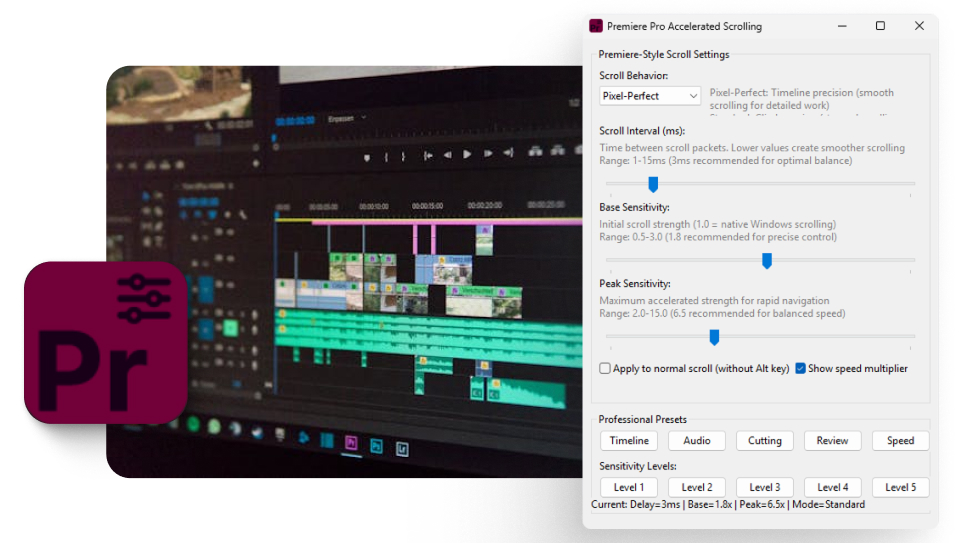
Scroll behavior
Pixel-Perfect or StandardPixel-Perfect carries the fraction of a step over to the next notch, so 1.8 really averages 1.8 and movement stays even. Standard rounds each notch and makes up the fraction at random, which feels more stepped. Pixel-Perfect is the one for the timeline.
Scroll interval
1 to 15 ms, default 3The pause between the extra steps it sends for one notch. Lower is smoother. Below 3 ms some machines struggle to keep up, which is why 3 is the default.
Base sensitivity
0.5 to 3.0, default 1.8How far a slow notch moves. 1.0 is what Windows does on its own, so 1.8 is a little under twice that. This is the number that decides how precise trimming feels.
Peak sensitivity
2.0 to 15.0, default 6.5How hard it climbs when you spin. Raise it to cross long sequences faster; lower it if quick turns overshoot.
Apply to normal scroll
Off by defaultOff, it only accelerates Alt plus the wheel. On, it accelerates the plain wheel too, still only inside Premiere Pro.
Show speed multiplier
On by defaultShows the multiplier beside the pointer while you scroll. Useful while tuning; easy to switch off once you have settled.
What each preset and level sets
Presets change all four values. Levels change only the two sensitivities, so your interval and behavior stay as they are.
| Button | Interval | Base | Peak | Behavior |
|---|---|---|---|---|
| Timeline | 4 ms | 1.2 | 2.0 | Pixel-Perfect |
| Audio | 2 ms | 2.5 | 8.0 | Standard |
| Cutting | 3 ms | 1.8 | 6.5 | Pixel-Perfect |
| Review | 5 ms | 1.8 | 3.5 | Pixel-Perfect |
| Speed | 1 ms | 3.0 | 12.0 | Standard |
| Level 1 | unchanged | 1.2 | 2.0 | unchanged |
| Level 2 | unchanged | 1.8 | 3.5 | unchanged |
| Level 3 | unchanged | 1.8 | 6.5 | unchanged |
| Level 4 | unchanged | 2.5 | 8.0 | unchanged |
| Level 5 | unchanged | 3.0 | 12.0 | unchanged |
The defaults are the same as Cutting and Level 3. Settings are not saved between runs yet, so the program starts on the defaults each time and a preset gets you back in one press.
What you need
-
Windows
It is built with AutoHotkey, which runs on Windows only. There is no Mac version.
-
Premiere Pro
Any version. It recognises Premiere by its program name, Adobe Premiere Pro.exe, and does nothing in any other window.
-
A mouse with a wheel
Ordinary notched wheels benefit most. Free-spinning and high resolution wheels work too, and the base value may want lowering.
Pausing it, and quitting it
It runs quietly, so it is worth knowing where its off switches are.
- The tray icon
Right-click it for Open Settings, Suspend Script and Exit. Double-click to reopen the window.
Win+ wheel upSuspends it, or resumes it. Handy when you want Premiere's own wheel back for a moment.
Win+ wheel downQuits the program. If it ever seems to stop working, this is the likely reason; run the .exe again.
- The close button
Hides the window to the tray. It keeps running until you choose Exit.
If it does not seem to work
Almost always one of these.
Nothing changes when I scroll
Out of the box it only acts while Alt is held. Tick Apply to normal scroll to accelerate the plain wheel, and make sure Premiere Pro is the window in front.
Windows or my antivirus warns about it
It is unsigned, and AutoHotkey programs send input on your behalf, which some scanners flag. The source is in the .zip; compile it yourself if you want certainty.
It worked, then stopped
Win plus wheel down quits it and Win plus wheel up suspends it, and both are easy to press by accident. Check the tray, or run the .exe again.
One notch zooms all the way in
That is a different fault, usually the mouse driver, and this tool will not cure it. The thirty second test tells you which it is.
Why the timeline feels wrong in the first place
A mouse wheel does not report smooth movement. It reports notches, and most mice send one fixed step per notch. Premiere moves a fixed amount for each one, so the timeline can feel like it only has two speeds: too slow when you are covering ground, and far too fast when you are trying to land on a cut.
Some mice make it worse rather than better. A free spinning wheel sends a burst of notches from one flick, and a high resolution wheel sends many small events where Premiere is expecting a few large ones.
What the amplifier actually changes
It sits between your mouse and Premiere. When Premiere is the window in front, each notch in a turn is sent on as several, a few milliseconds apart: nearly two in a steady turn with the default settings, and more the faster you turn. A single notch on its own still moves one step. Everywhere else, including other Adobe apps, the wheel behaves exactly as it did.
When to reach for it, and when not to
Reach for it when you work across long sequences and the wheel is either too coarse to be precise or too fine to cover distance. The presets exist so you are not tuning numbers at the start of every project.
Do not reach for it first if one notch of the wheel slams the timeline to maximum zoom. That has a different cause, and the thirty second test tells the two apart. If the wheel is fine and moving around is simply awkward, the keyboard moves are worth learning first, since they are free and land exactly on a cut.
What it does not do
It changes what one notch of the wheel does inside Premiere, and nothing else. It does not open or touch your project files, does not change keyboard shortcuts, does not run inside Premiere, and does not connect to the internet. It is open source, so all of that is something you can check rather than take on trust.