

Checking a meta description is easy. Open the page, view source, find the tag, read it. Checking forty of them that way takes an afternoon, and by page fifteen you are no longer really reading, you are scrolling until something looks wrong. Which means the things you find are the obvious ones, and the ones you were worried about are still there.
What you want instead is every page in one table, side by side, with the lengths already counted. Then the comparison does the work. Here is how to get that, and more importantly how to read it, because a table of forty rows is only useful if you know which three columns matter.
Pick the scope before you press the button
The most common thing that goes wrong is that people paste a domain, press extract, get one row, and conclude the tool is broken.
It is not. The three cards under the address box are the scope, and the first one is selected until you say otherwise.
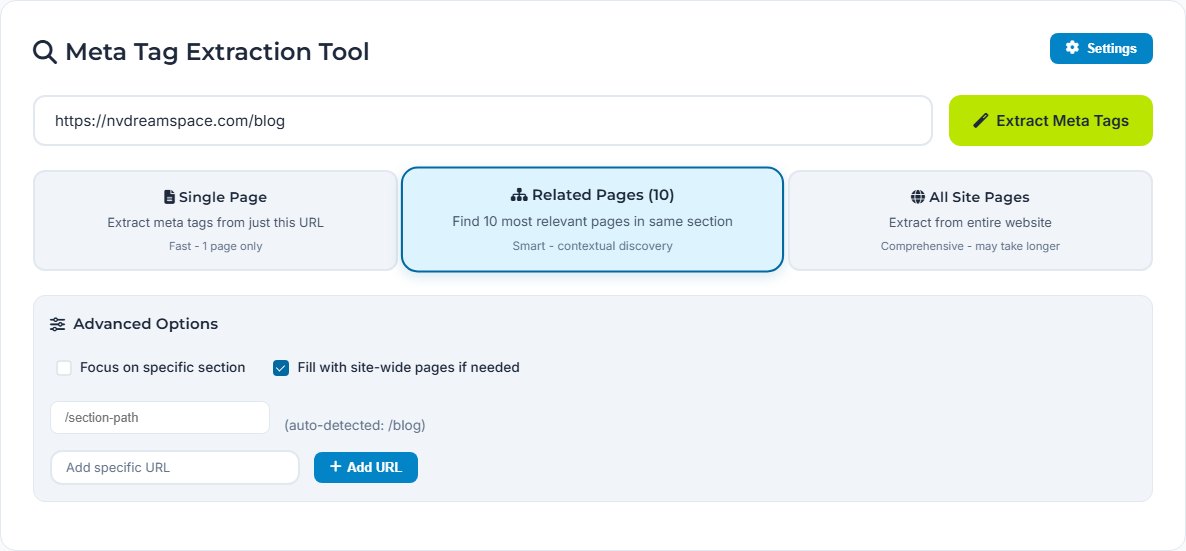
Single Page reads the one URL you gave it. Use it to check a page you have just published, or to see what a specific URL is actually serving.
Related Pages takes your URL as a seed and finds ten pages related to it. This is the one I use most, because ten rows is enough to see a pattern and few enough that you will genuinely read all of them. Point it at a section rather than the homepage and you get that section.
All Site Pages does what it says and takes longer. Worth it once a quarter, or before a migration, and overkill for a Tuesday.
Under Settings there are two options that change what comes back. Focus on specific section plus a path keeps discovery inside, say, /blog. Fill with site-wide pages if needed is on by default, and it means a thin section gets topped up from elsewhere on the site to reach the count. That is usually helpful and occasionally confusing, because it is why a section audit sometimes returns pages from outside the section. If you want the section and nothing else, turn it off.
There is also an Add specific URL box. Anything you queue there is included alongside whatever discovery finds, which is the only way to reach a page nothing links to.
What comes back
Here is a real run: the seed was our own /blog, the scope was Related Pages, and it returned ten of ten.
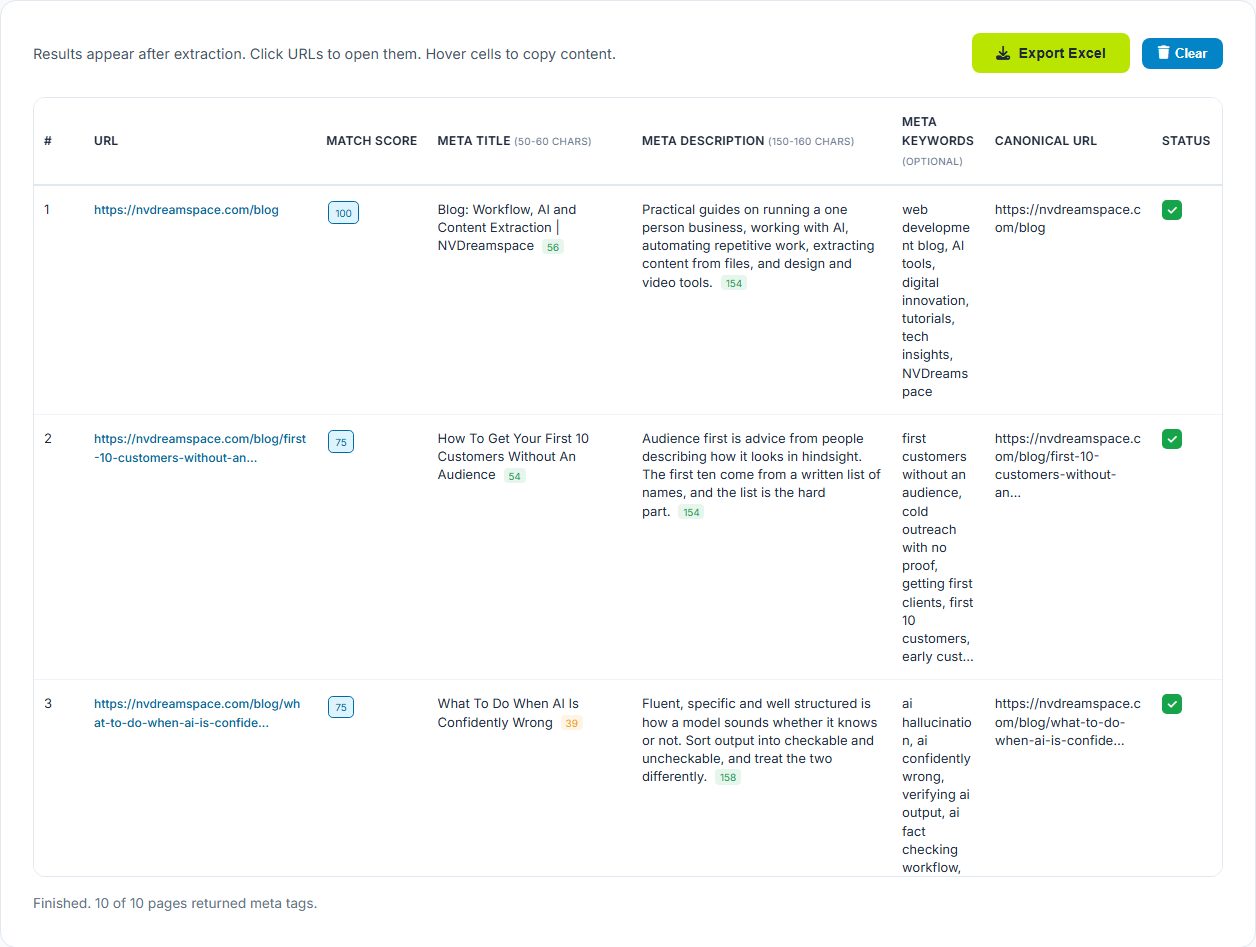
Eight columns, and three of them are the ones you actually read.
Match score is how closely a page relates to the URL you seeded from. The seed itself scores 100, because it is the page you asked about. Everything discovered from it scores lower. It is a property of the crawl, not a verdict on the page, and reading it as a quality score is the single easiest mistake to make with this table.
The character counts are the small badges next to each title and description, green inside the stated range and amber outside it. The header says what those ranges are: 50 to 60 for a title, 150 to 160 for a description.
Canonical URL is the column people skip and should not. A canonical pointing somewhere unexpected is a much bigger problem than a description that is ten characters short, and it is invisible on the page itself.
Reading the counts without over-reading them
In that run, one title came back at 39 characters and got flagged. Another page's description was 173 and got flagged the other way.
Neither is automatically a defect. Those ranges are roughly where text stops getting cut off in a desktop result, and they are a display consideration rather than a ranking one. Google also rewrites a clear majority of titles, which we went into properly in why Google is not showing your meta tags, so a title tuned to exactly 58 characters may not be the thing anyone sees.
So treat amber as a prompt to open the page, not as a repair job. A 39 character title that says precisely what the page is beats a 58 character one padded with the brand name and a pipe. What you are looking for in that column is not length, it is a title that would not tell a stranger what they are about to read.
Sort the export by description and look for duplicates. Two pages with the same description almost always means a template is filling it in, which means neither page is describing itself. That is a real problem and it is invisible one page at a time, which is the whole reason to do this in a table.
What an audit is actually looking for
Four things, roughly in order of how much they matter.
- Missing entirely. A blank description or a title that is just the site name. The tool shows
not setrather than an empty cell, so these are easy to scan for. - Duplicated across pages. Usually a template default that nobody replaced. Worse than missing, because it looks filled in.
- Canonical pointing somewhere odd. At a staging domain, at the homepage, at a URL with tracking parameters on it. Rare and expensive when it happens.
- Length outliers. Last, and least. Useful as a signal that a page was written carelessly rather than as a fault in itself.
Notice that three of those four are only visible when you have several pages next to each other. That is the argument for doing this in one pass rather than one page at a time, and it is a stronger argument than the time saved.
What it cannot see
It reads the HTML the server returns for a URL. If your tags are in that HTML, it sees them. If a framework injects them after the page loads, what you get back is whatever the served document said, which might be a generic fallback. That is not a limitation so much as a useful second opinion: it is much closer to what a crawler sees on a first pass than what your browser shows you after everything has run.
It also cannot see pages nothing links to. Discovery follows what it can find, so orphan pages stay invisible unless you add them by hand. If a page matters and nothing links to it, you have found a different problem.
And it is a read. Nothing about this writes to your site, so an audit cannot break anything, which is worth saying because plenty of SEO tooling asks for far more access than looking at public pages requires.
Export it and date it
Export Excel takes the table as it stands. Save it with the date in the filename and do not throw the old ones away.
A single audit finds the obvious problems, and you fix them, and then you have no idea whether they stayed fixed. Two audits three months apart tell you which pages changed without anyone deciding to change them, which templates have drifted, and whether the last round of edits survived a deploy. That is the part that actually pays for the exercise, and it costs one file and a sensible filename.
- Pick a scope first. Single Page is the default and it does exactly one URL.
- Related Pages seeds from a section and finds ten. It is the right size for a real audit round.
- The match score is about how the crawl found a page, not how good the page is.
- The character counts are a prompt to look, not a rule to obey.
- Export each run with a date on it. The comparison is where the value is.
Run one on your own site
Paste a section URL, choose Related Pages, and read the ten rows that come back. It takes about a minute and you will find at least one thing.
Open the Meta Tag ExtractorFrequently asked questions
Why did it only return one page?
Single Page is the default scope, and it does exactly one URL. The three scope cards sit under the address box and the first one is selected until you pick another. Choose Related Pages for ten, or All Site Pages for everything it can reach.
What does the match score mean?
How closely a discovered page relates to the URL you started from. The page you typed in scores 100 because it is the seed. Pages found from it score lower. It is a relevance measure for the crawl, not a quality score for the page, so a low number says nothing about how good that page is.
Are the character count ranges rules I have to follow?
No. They are the widths at which a title or description usually survives without being cut in a desktop result, and Google rewrites a majority of titles anyway. Treat a flagged count as a prompt to look at the page, not as a defect to fix on sight. A short title that reads well is better than a padded one that hits sixty.
Does it see pages rendered by JavaScript?
It reads the HTML that comes back for the URL. If your meta tags are written into that HTML, it sees them. If they are injected by a framework after load, it will report what the served document says, which may be a generic fallback. That is worth knowing either way, because it is closer to what a crawler gets on its first pass than what you see in the browser.
Can I check pages that are not linked from anywhere?
Yes. Open Settings and use the Add specific URL box to queue them by hand before you extract. Orphan pages are exactly the ones discovery cannot find, so if you know they exist, add them yourself.
What do I do with the Excel export?
Keep it as a dated snapshot. The value of an audit is mostly in the comparison, so a file per quarter tells you which pages changed, which templates drifted, and whether the last round of fixes stayed fixed. A single audit with nothing to compare it against only finds the obvious problems.