
Microsoft-Decision-1 is not another chatbot. It answers questions that have a fixed set of answers, yes or no, which of these, or how much, and it returns a probability for each option instead of a paragraph. Microsoft announced it on 9 October 2026 and charges $0.042 per million input tokens, with output free. If a step in your work is someone, or some model, picking from a known list, this is built for that step. If the step needs anything written, it is not.
That distinction is the whole story, and most of the coverage skipped past it to get to the benchmark chart. Below is what it gives back, where it earns a place in a working week, and what to check before you trust it with anything that matters.
Sort your decisions before you look at the model
The useful question is not whether Decision-1 is good. It is which of the judgements you already make, or already pay a language model to make, have a closed list of answers. Those are the only ones it can take.
| The step in your work | Hand it to Decision-1? | Why |
|---|---|---|
| Routing an email, ticket or request to a person or team | Yes | A fixed set of destinations is exactly a choice question. Microsoft's own quickstart is a support ticket router. |
| Tagging feedback, survey replies or documents | Yes | Microsoft says its Xbox Research team used it to label more than 10,000 open-ended feedback items. |
| A yes or no check before something acts, such as "does this touch production data?" | Yes, with a threshold | That example is from Microsoft's documentation. You set the gate on the probability, not on a yes. |
| Grading AI drafts against a rubric before they go out | Yes, for ranking | Microsoft's docs say to use its scores for relative ordering and thresholds, not as absolute marks. |
| Choosing which model, tool or agent handles a request | Yes | Model, tool and agent selection is on Microsoft's list of intended uses. |
| Writing, summarising, translating or explaining | No | It does not generate text and gives no reasons for its answers. |
| Decisions about people, such as hiring or credit | Only as support | Microsoft says not to use it as the sole decision-maker for consequential decisions about people. |
Most professionals will find more rows in the first five than they expect. Much of what gets called AI work in an office is sorting, not writing.
Read what it actually gives back
Every call sends two things: a state, which is the text or JSON being judged, and one or more named questions. Each question is one of three types.
- noul, for "is this true?": a probability from 0 to 1.
- choice, for "which option is it?": one selected option and a probability for every option.
- score, for "how much?": a place on an ordered scale you define, listed from lowest to highest.
This is the body of a routing call, as Microsoft's documentation shows it:
{
  "state": "The API returns 500 on every call.",
  "questions": {
    "team": {
      "type": "choice",
      "instructions": "Which team should handle this ticket?",
      "criteria": {
        "billing": "Charges, invoices, and refunds",
        "engineering": "Bugs, errors, and outages",
        "support": "How-to and account questions"
      }
    }
  }
}
What comes back is the chosen option and a probability for each one. No explanation, no prose. That is the useful part, because a probability can be acted on and a paragraph cannot. You can route automatically above a cut-off and send everything below it to a person, which is exactly what Microsoft suggests: treat a low top probability as the signal to escalate.
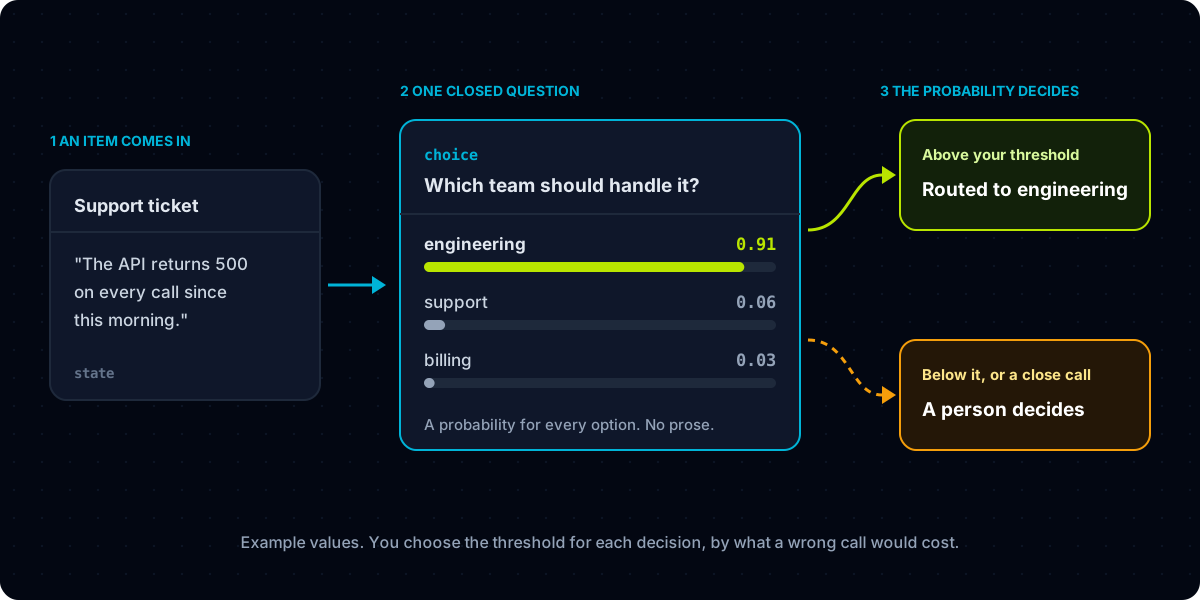
Questions about the same input can share a request. One call can route a ticket, rate how severe it is, and check whether the customer has written before.
Weigh Microsoft's numbers as Microsoft's numbers
All three come from Microsoft, and none has been reproduced by anyone else yet. Microsoft also reports the highest accuracy in a comparison across 36 benchmarks and nearly 150,000 questions kept out of training. Treat these as the reason to test it, not as the result of testing it. Microsoft's own documentation says the same thing in plainer words: validate it on data that looks like yours.
Speed is the figure that matters most for the way it is meant to be used. Microsoft's example: add 100 milliseconds to each of 20 decisions made one after another, and the whole chain is two seconds slower. Decisions inside a workflow come in chains, which is why a slow, articulate model is the wrong tool for them, however clever it is.
Picture it in a working week
Strip away the agent language and these are the places a model like this would sit on a professional's desk. None of them needs anything more exotic than an automation tool that can send a web request.
The shared inbox. The automation that already files your email can ask which of your six labels a message belongs to. Anything where the top probability is low goes to a review folder instead of the wrong one, so the mistakes are visible instead of buried.
The brake on an agent. If you let an assistant act for you, put a yes or no question in front of the actions you would want to see first: does this send money, delete something, or write to a client? At this price it costs very little to ask before every single action.
The second reader for AI drafts. Score each draft against the few things that must be true, matches the brief, quotes the right price, keeps your tone, and read only the bottom of the list yourself. Microsoft says its Copilot team uses it for quality control of chat and agent responses.
The router. Send easy requests to a small, cheap model and hard ones to a capable, expensive one, and let the decision that picks between them cost a fraction of a cent.
Your own PC, not yet. Decision-1 runs as a hosted service in Microsoft Foundry, with OpenRouter listed as coming soon, so today it means an Azure account rather than something on your laptop. It is built on Qwen3.5-9B, a 9 billion parameter model that is small by current standards, but Microsoft offers it only as a service.
Rule these out before you wire it in
Four checks, in order. Each one either clears or tells you this is not the right tool yet.
- Write the options down. If you cannot list every possible answer in advance, it is not a Decision-1 problem. Where a forced choice would be worse than no choice, add an option such as "cannot tell", which Microsoft recommends.
- Collect real examples with the right answer marked. A few dozen from your own work is enough to start. Microsoft's quickstart measures accuracy and latency on labelled examples before anything is automated, and that is the habit to copy.
- Set the threshold by the cost of being wrong. A misfiled newsletter costs nothing; a misrouted refund request costs a customer. Pick the cut-off decision by decision, and send everything under it to a person.
- Shuffle the options and reword the question once. Run your examples again. Microsoft warns that scores can change with wording and option order, and that a badly framed question still returns a score. If yours move, fix the wording before going live.
If that sounds like writing a good process document, it is. The same discipline is behind writing an SOP an AI can follow, and it pays off whichever model ends up reading it.
What I had wrong
I read the announcement as a faster, cheaper language model and started a list of prompts to move across. That was the wrong frame. Nothing moves across, because nothing it does involves writing. The work is in turning a vague judgement into a closed question with options a stranger could apply, and that work was always the hard part.
I also took the price for the headline. For the way it is meant to be used, the headline is the probability. A model that tells you how sure it is lets you decide, step by step, how much of a workflow runs without you, and that is a more interesting thing to hand a professional than another chat window.
Frequently asked questions
What is Microsoft-Decision-1?
A hosted Microsoft model, announced on 9 October 2026, that answers closed questions, yes or no, multiple choice, or a rating on a scale, with a probability for each option instead of written text. It is meant for routing, classification, prioritisation, checks and grading.
How much does Microsoft-Decision-1 cost?
Microsoft lists $0.042 per million input tokens, and output tokens are free, because the model returns numbers rather than text.
Can Microsoft-Decision-1 replace ChatGPT or Copilot?
No. It does not write, summarise or explain anything. It is meant to sit next to a generative model, deciding where work goes and whether it is good enough, while the generative model does the writing.
Where can I use Microsoft-Decision-1?
In Microsoft Foundry, where you deploy it from the model catalogue and call a decision API on your Foundry resource. Microsoft says access through OpenRouter is coming.
Written from Microsoft's announcement on Command Line and its Foundry documentation, both published on 9 October 2026 and read on 12 October. We have not run the model ourselves yet, and every performance figure here is Microsoft's own. The image at the top belongs to Microsoft and is used here for reporting and comment.