
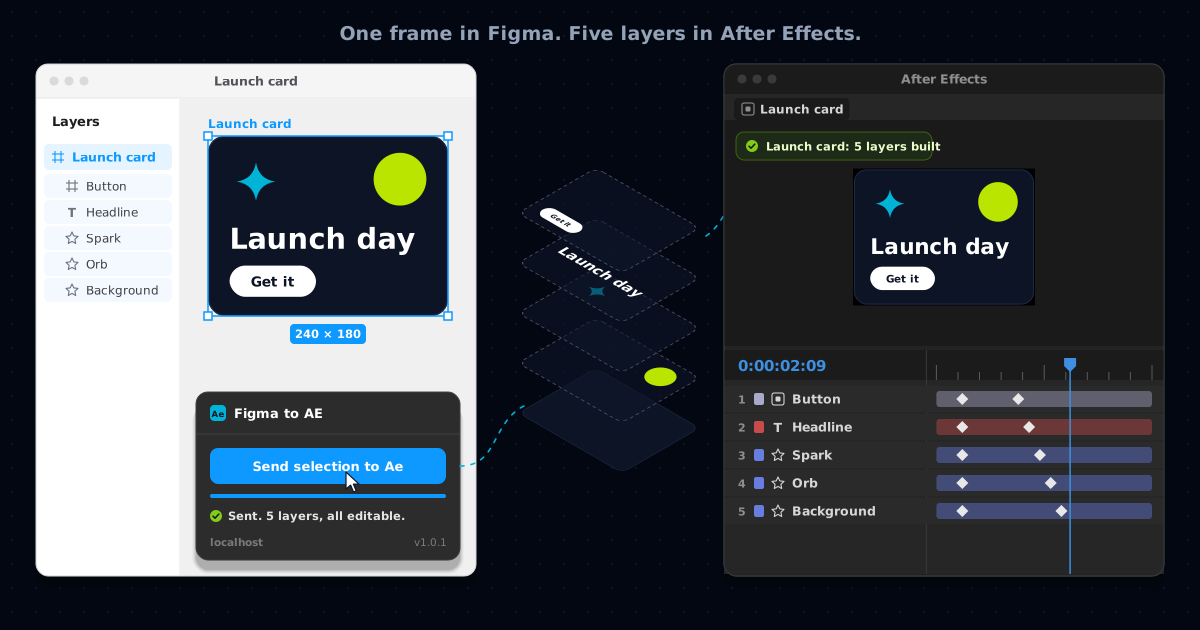
On a Thursday afternoon, with a card I had designed on Monday finally approved and the motion version due the next morning, I opened After Effects and started drawing a rounded rectangle. I had drawn that exact rectangle three days earlier, at that exact size, with that exact corner radius. It was sitting in the Figma file in the next window, and I was copying it across by eye, the way you would trace a drawing through thin paper.
Redrawing your own work leaves a different tiredness from the one making something leaves behind. It feels like filling in a form you have already filled in. I have done it on more projects than I would like to count, and somewhere along the way I stopped noticing it, which is the worst thing that can happen to a chore.
One thing before going further. The tool this post ends on is ours. Figma to AE is made by NVDreamspace, the site you are reading, and I have been using it on my own work since before it went live on the Figma Community. I have tried to be as plain about what it does not do as about what it does, but weigh what follows with that in mind.
Exporting gives After Effects a picture of your work
The usual ways across arrive at roughly the same place. Export the frame as a PNG and import it, and After Effects has one layer, which is a photograph of your design. It looks right in the viewer. It is right, as a picture. The trouble starts the moment you want to move one thing in it, because there is no one thing. The headline, the button and the background are all the same pixels.
Going through Illustrator gets you further, and I used that route for a long time. The shapes come back as paths you can animate. In my experience, though, the text arrives as outlines or not at all, and the grouping you built so carefully in Figma flattens into one long list. The time you saved on the shapes goes on renaming and regrouping everything so there is something to parent to.
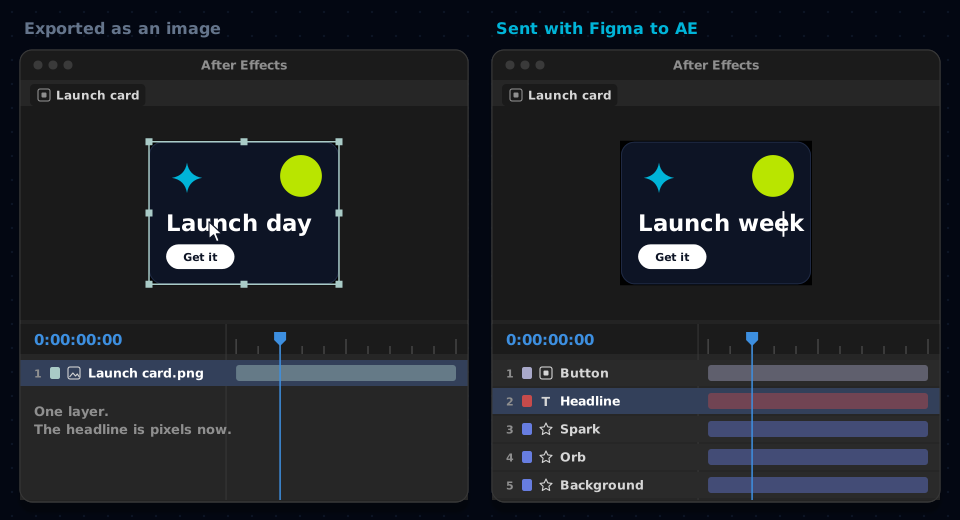
I keep coming back to how invisible that difference is. The two comps above look identical in the viewer. The gap only shows once you start animating, which is exactly when you have the least time to deal with it.
The second rebuild is the one that hurts
The first rebuild is annoying, but you budget for it, more or less, the way you budget for rendering. The second one does the damage. The client sees the motion version, likes it, and asks for a shorter headline and a different word on the button. In Figma that is a minute's work. In After Effects it is the same rebuild again on a smaller scale, done more carefully this time, because now there are keyframes attached to the things you are replacing.
Redrawing your own rectangle is a particular kind of tired, and nobody puts it in the estimate.
Which sounds precious, but I think it changes the work as well as the schedule. When every change costs a rebuild, you start resisting changes. I have caught myself arguing against a perfectly good note because I knew what it would cost me in the timeline, and dressing that up as a design opinion. It is a bad reason to defend a decision, and clients can usually tell.
A tool I stayed loyal to for too long
For years there was an answer to this, and it was AEUX. It was built by the motion design team at Google and released as open source, and it did the thing I wanted: select a frame in Figma, press a button, and the layers turned up in After Effects as layers. I used it on most projects where design and motion overlapped.
Then it stopped working. Its last release, 0.8.2, went out in September 2022. Figma changed, After Effects changed, and the connection between them quietly broke. I kept it installed for a long time afterwards, the way you keep a pen that has run dry in the pot on your desk, and every few months I tried it again in case something had changed. Nothing had. People kept opening issues about it, and there was nobody left to pick them up.
Because it was open source, it did not have to end there. Figma to AE is AEUX, repaired. The connection works again and the After Effects panel was rebuilt, and it runs on every After Effects from 2019 through the 2026 releases. All of the original work, and the credit for it, belongs to the AEUX authors. It is not affiliated with or endorsed by Google or Adobe.
What arrives when you press the button
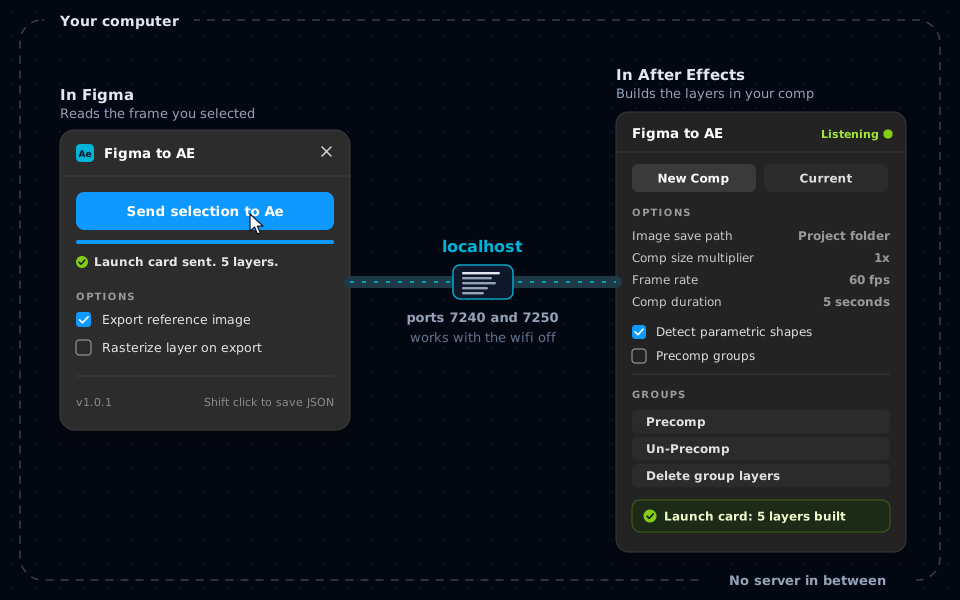
The Figma side is one button, Send selection to Ae, and two options. You select a frame, press it, and watch the bar underneath. On the After Effects side a panel sits docked and listening, and builds the layers either into a new comp or into the one you already have open.
What lands is what you would have built by hand if you had the patience. Rectangles, ellipses, stars and vector paths become shape layers with their own paths and fills. Text arrives as live text layers, so a headline can be retyped instead of redrawn. Groups and frames keep their nesting and can come in as precomps, which is what gives you something to rig against. Clipped content keeps its mask rather than arriving cropped into a bitmap. Anything that genuinely has to be a raster, a photograph for instance, is exported and placed where it belongs at the right size, and components and instances are read like any other layer.
The option I thought hardest about is Precomp groups, because it decides what the comp feels like to live inside. I leave it off for something small like a card, since five layers do not need five comps to dig through. For a whole screen I switch it on, because then the nesting is the only thing keeping the timeline readable. I also keep Detect parametric shapes ticked, so a rectangle arrives as an After Effects rectangle I can resize by typing a number, instead of four points on a path.
For the curious: what travels between the two apps
If you only want the layers, you can skip this part. I wanted to know what was going on underneath before I trusted it with client work, so here it is in principle, without any code.
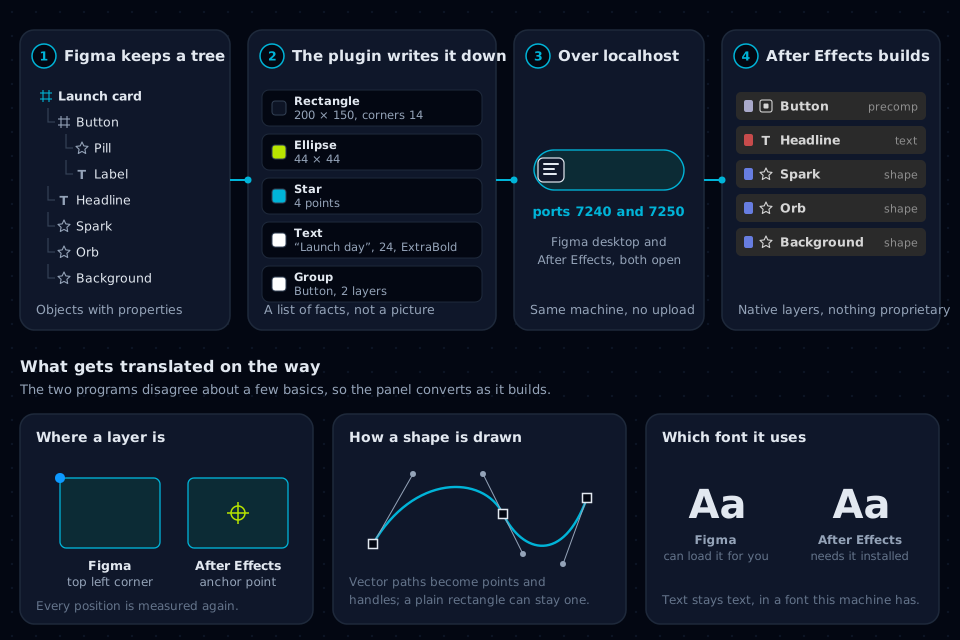
Figma does not store your design as an image. It keeps it as a tree of objects: the frame at the top, groups inside it, and inside those the rectangles, paths and text, each carrying its own size, position, fill, stroke, corner radius, font and so on. The layers panel down the left of Figma is that tree, drawn as a list.
When you press Send, the plugin walks through your selection and writes each object down. The result is closer to a floor plan than a photograph. This is a rectangle, it is 200 by 150, its corners are 14, and it is filled in this colour. This is text, it says Launch day, in this font at this size. Nothing in it is a pixel, apart from any image you have asked it to keep as one.
That description then has to get from one program to the other. While the After Effects panel is open, it listens for it on your own computer, at an address called localhost, on ports 7240 and 7250. Localhost is a computer talking to itself, so the description never goes out to the internet. That is why there is no account and nothing is uploaded, and why the whole thing works with the wifi off.
It also explains the two rules that catch people out. Both halves have to be open at the same time, because when the panel is closed nothing is listening. And it has to be the Figma desktop app, because a browser tab is not allowed to reach a program running on your own machine.
Finally the panel hands the description to After Effects' own scripting, which builds each layer the same way a script you wrote yourself would. That matters more than it sounds. What you end up with are ordinary After Effects layers, and nothing in the comp depends on the plugin afterwards. A project still opens on a machine that has never had it installed, as long as the folder of exported images travels with it.
Most of the cleverness is in the translation, because the two programs disagree about some basics. Figma measures where a layer is from its top left corner. After Effects places a layer by its anchor point, inside a comp with its own origin, so every position has to be measured again on the way in. Shapes are described differently too: a Figma vector becomes After Effects' points and handles, while a plain rectangle can stay a rectangle. Like the colour problem I wrote about in why exported video looks washed out, none of this is anybody's mistake. These are two reasonable programs that were never designed to agree.
Figma can load a lot of fonts for you without them ever being installed on your computer. After Effects can only set text in a font the machine actually has. If a headline arrives in the wrong typeface, the transfer has not failed. Install the font, reopen the project, and the text layer picks it up.
What it will not do for you
It carries the drawing and none of the behaviour. Auto layout, constraints and prototype transitions have no equivalent in a comp, so what arrives is where everything was at the moment you pressed the button. Resizing the comp will not reflow anything the way Figma would.
It does not animate anything either, and I was relieved to find that out. Every keyframe in the comp is still a decision I made. What it took away was the hour of tracing, which I was doing on autopilot anyway.
When the design changes, it does not update a comp you have already animated. Pressing Send again builds a fresh set of layers. What I do now is send only the part that changed, the new headline or the new button, into the current comp, and move the keyframes across from the old layer. That takes minutes rather than an afternoon, but it still takes minutes, and I would rather say so.
There are some practical edges too. It needs the Figma desktop app. If two versions of After Effects are open, whichever you opened first owns the connection. And every fix so far was written and verified on Windows. Nothing in it is specific to one system and macOS is expected to work, but it has not been tested there yet, so if you are on a Mac you are, for now, the test, and a report helps.
Thursday, again
The card went out on the Friday. The following Wednesday the client asked for a second version with a different headline and a lime button instead of a white one, the kind of note that used to take most of an afternoon. I changed it in Figma, sent the headline and the button across, moved the keyframes over and rendered, and it was done before I had finished the cup of tea I made when the email arrived.
I keep thinking about how long I went on drawing that rectangle by hand. The fix was never hard to find. The chore had simply become part of how I thought the work went, and you do not go looking for a way out of something you have stopped seeing.
- Exporting a Figma frame as an image gives After Effects one flat layer. It looks right and cannot be changed piece by piece.
- Figma to AE sends a description of the frame instead, and After Effects builds shape, text and group layers from it.
- Both halves have to be open: the plugin in the Figma desktop app and the panel in After Effects.
- Nothing leaves your computer. The two talk over localhost, and the transfer works offline.
- It moves the drawing and leaves the animation to you. When the design changes, send only the part that changed.
- Install the fonts a design uses before you send it, because After Effects can only use fonts it has.
Give Figma to AE by NVDreamspace a try
Free, with no account, and the transfer never leaves your computer. Install the Figma plugin and the After Effects panel, open both, and send a frame. The four setup steps are at nvdreamspace.com/figma-to-ae.
Get Figma to AEFrequently asked questions
Is Figma to AE free?
Yes. There is no account, no trial and no paid tier. It is a repair of the open source AEUX project, offered back to the people who used the original.
Does it work with Figma in the browser?
No. It needs the Figma desktop app, because a browser tab is not allowed to reach a program running on your own computer, and the After Effects panel is exactly that.
Does text stay editable in After Effects?
Yes. Text arrives as live text layers rather than outlines, so you can retype and restyle it. After Effects can only use fonts installed on your machine, so install the fonts the design uses before you send it.
Is Figma to AE the same as AEUX?
It is AEUX, repaired. The original was built by the motion design team at Google, and its last release was 0.8.2 in September 2022. Figma to AE is that code with the connection fixed, the panel rebuilt and version support brought up to date. It is not affiliated with or endorsed by Google or Adobe.
Is my design uploaded anywhere?
No. The Figma plugin and the After Effects panel talk over localhost on your own computer, using ports 7240 and 7250. Nothing is sent to a server, and the transfer works with no internet connection at all.
Which versions of After Effects does it support?
After Effects 2019, version 16.0, and newer, including the 2026 releases. One copy of the panel serves every version you have installed. It has been tested on Windows; macOS is expected to work but has not been tested yet.
How this was put together: the setup, options and limits described here match the Figma to AE page as of 9 October 2026, and the plugin and panel shown are version 1.0.1. The illustrations are drawings of the two interfaces rather than screenshots, and the launch card in them is an example made for this post. Figma to AE is made by NVDreamspace.